
Understanding AI Import Credits
Articles in this section
🚀 Getting Started
📥 Importing Recipes
- How to Import Recipes
- Import from a Website
- Import from Instagram
- Import from Facebook
- Import from TikTok
- Import from Pinterest
- Import from YouTube
- Scan a Recipe from Photo
- Dictate a Recipe by Voice
- Import by Pasting Text
- Use the In-App Browser
- Write a Recipe from Scratch
- Review & Edit Before Saving
- Understanding Import Credits
📂 Managing Recipes
👨🍳 Cooking Mode
📅 Meal Planning
🛒 Grocery List
📤 Sharing & Export
💳 Billing & Subscription
⚙️ Account & Settings
ℹ️ About Cookonut
💡 Ideas & Feedback
Cookonut uses a credit system for AI-powered recipe imports. This article explains everything about how credits work, so you can make the most of your monthly allowance.
The Basics
- Free plan: 10 AI import credits per month
- Premium plan: Unlimited (no credit system)
- Credits reset monthly on your billing cycle date
What Uses a Credit
Each of these import methods uses one credit per import:
- Search the web — finding and saving a recipe from a website using the in-app browser
- Scan recipe — scanning a cookbook page, recipe card, or screenshot
- Dictate recipe — dictating a recipe
- Paste text — pasting recipe text for processing
All four methods share the same credit pool. If you import 4 recipes from the web, 3 from photos, and 3 by voice, you’ve used 10 credits total.
What Does NOT Use a Credit
- Writing a recipe from scratch — always free, always unlimited
- Editing a saved recipe — change anything, any time, no cost
- All other features — cooking mode, meal planner, grocery list, cookbooks, search, filter, export, print, sharing via text/email
When Exactly Is a Credit Used?
A credit is consumed when the AI starts processing your import — not when you tap “Save.” This means:
- If you import but don’t save the recipe, the credit is still used
- If the import fails or is incomplete, the credit is still used
- If you re-import the same recipe, it uses another credit
This is why it’s important to review the import preview carefully and make edits there, rather than discarding and starting over.
Checking Your Credit Balance
- Go to the More tab
- Your remaining credits are displayed along with the reset date
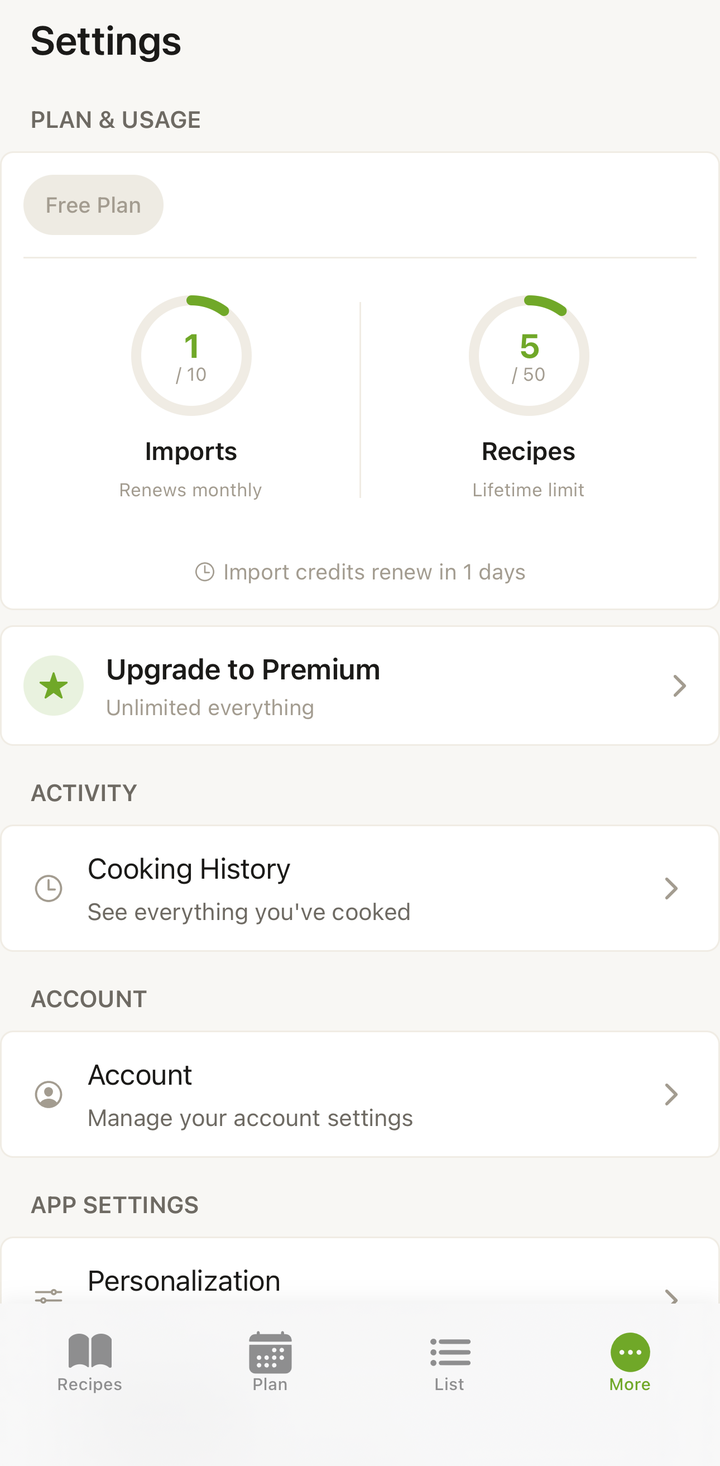
Credit Reset
Credits reset to 10 on your monthly cycle date. Unused credits do not roll over — if you only used 3 credits this month, you’ll still have 10 (not 17) next month.
Making Credits Last
On the free plan, 10 credits per month works out to about 2-3 imports per week. Here are strategies to make them count:
Use “Create from scratch” for recipes you know: If you know a recipe by heart or can type it from a card, write it manually. Save your credits for complex web imports.
Import from well-structured sources: Major recipe blogs and sites produce the most accurate imports, reducing the chance you’ll need to re-import.
Review before discarding: If an import isn’t perfect, edit it in the preview rather than discarding and re-importing (which costs another credit).
Copy text instead of sharing links: For social media recipes, sometimes copying the post text and using “Paste Text” gives cleaner results than importing the link.
Batch your imports: If you know you want to save several recipes, plan a single session to import them rather than spreading them out (less risk of forgetting and re-importing).
What Happens When You Run Out
If you’ve used all 10 credits this month:
- Manual entry still works — you can write as many recipes as you want from scratch
- All other features work — cooking, planning, shopping, editing, exporting
- You’ll see a message if you try to AI-import, letting you know credits are used up
- Wait for reset — credits come back at the start of your next cycle
- Upgrade to Premium — for unlimited imports if you need more
Upgrading for Unlimited Credits
If you regularly hit the 10-credit limit, Premium ($4.99/month or $38.99/year) removes the cap entirely. Import as many recipes as you want, from any source, with no monthly limit.
Frequently Asked Questions
Can I buy extra credits without subscribing to Premium? Currently, additional credits are not available a la carte. The options are the free 10 monthly credits or unlimited with Premium.
Do credits carry over to the next month? No, unused credits expire at the end of each cycle.
If I upgrade mid-month, do I get my used credits back? With Premium, credits are no longer tracked — you have unlimited imports immediately.
Do family members share credits? Each account has its own credit pool. If two people in your household each have free accounts, each gets their own 10 credits.
Thanks for your feedback! We're glad it helped.