
Delete Your Account
Articles in this section
🚀 Getting Started
📥 Importing Recipes
- How to Import Recipes
- Import from a Website
- Import from Instagram
- Import from Facebook
- Import from TikTok
- Import from Pinterest
- Import from YouTube
- Scan a Recipe from Photo
- Dictate a Recipe by Voice
- Import by Pasting Text
- Use the In-App Browser
- Write a Recipe from Scratch
- Review & Edit Before Saving
- Understanding Import Credits
📂 Managing Recipes
👨🍳 Cooking Mode
📅 Meal Planning
🛒 Grocery List
📤 Sharing & Export
💳 Billing & Subscription
⚙️ Account & Settings
ℹ️ About Cookonut
💡 Ideas & Feedback
If you decide to leave Cookonut, you can permanently delete your account and all associated data. This guide explains the process and what to expect.
Before You Delete
Account deletion is permanent and irreversible. Before proceeding, consider:
- All your recipes will be deleted — every recipe in your collection, including those you created manually
- Cookbooks, tags, and meal plans will be removed
- Grocery lists will be cleared
- Your account preferences and settings will be erased
- There is no way to recover your data after deletion
Export First
If you want to keep any recipes before deleting:
- Export individual recipes as PDF — open each recipe, tap the options menu, and choose Export as PDF
- Print important recipes — print the ones you want to keep on paper
- Share recipes via text or email to yourself as a backup
Take the time to save anything you might want in the future.
Cancel Your Subscription First
Deleting your Cookonut account does not cancel your subscription — it lives on your Apple ID or Google account. If you want to keep using Premium on another Cookonut account, link it there first (Link my Premium or Restore Purchases), and only then delete the old account.
If you have a Premium subscription, cancel it before deleting your account:
On iPhone/iPad
- Open your phone’s Settings
- Tap your name at the top
- Tap Subscriptions
- Find Cookonut and tap Cancel Subscription
On Android
- Open the Google Play Store
- Tap your profile icon
- Tap Payments & subscriptions > Subscriptions
- Find Cookonut and tap Cancel subscription
Deleting your account does not automatically cancel billing through Apple or Google. Cancel the subscription separately to avoid being charged after deletion.
How to Delete Your Account
- Open Cookonut
- Go to the More tab
- Scroll to the bottom
- Tap Delete Account
- Read the warning carefully
- Confirm that you want to proceed
- You may be asked to re-authenticate (enter your password or use biometrics)
- Tap Delete to confirm
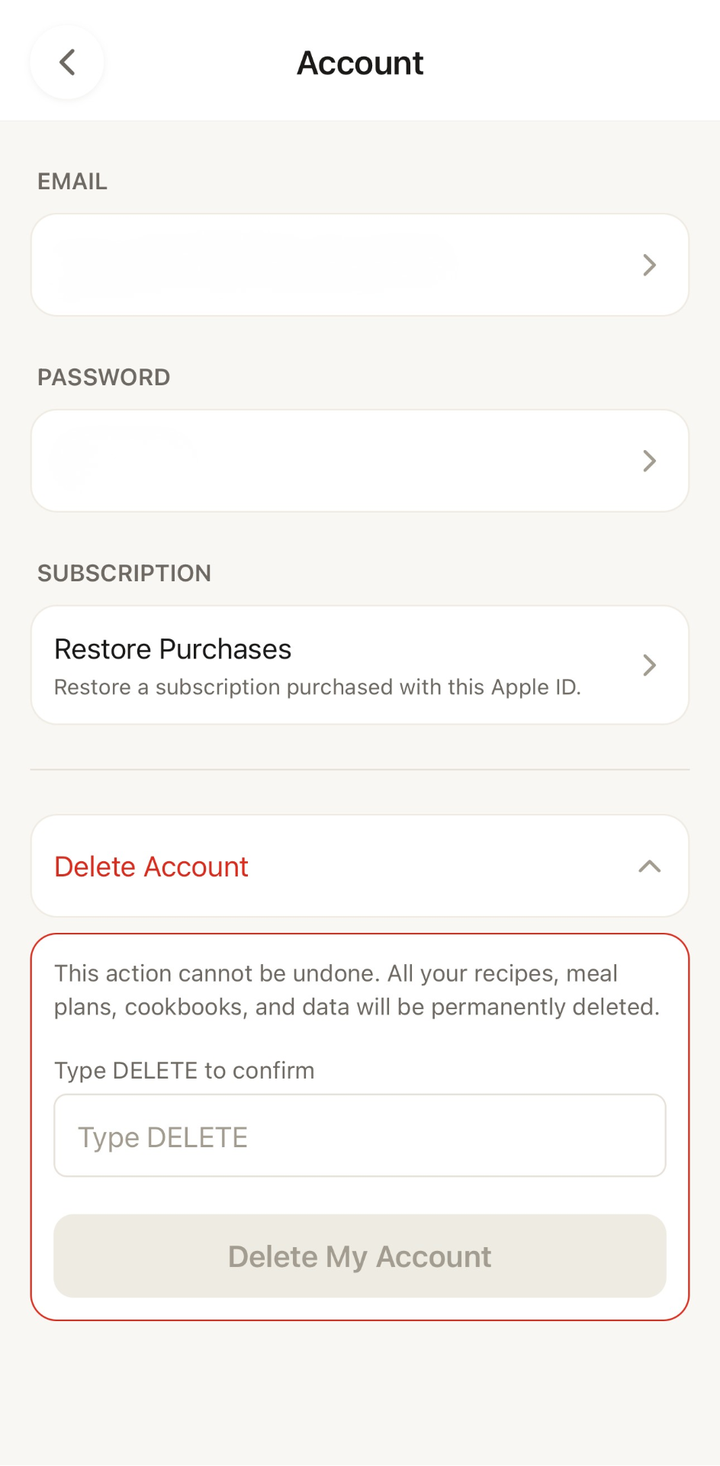
What Happens After Deletion
- Your account is immediately deactivated
- All data (recipes, cookbooks, meal plans, grocery lists, settings) is permanently deleted from our servers
- You’re signed out of the app
- The Cookonut app remains on your phone but you’ll need to create a new account to use it again
Can I Re-Create an Account?
Yes. After deleting your account, you can create a new one using the same email address. However, the new account will be completely empty — none of your previous recipes or data will be present.
Troubleshooting
Can’t find the delete option: Make sure you’re looking at the very bottom of the Settings screen. The delete account option is intentionally placed away from other options to prevent accidental taps.
Delete button not responding: Make sure you have an internet connection. Account deletion requires communicating with our servers.
Still being charged after deletion: You need to cancel your subscription separately through the App Store or Google Play. Account deletion alone does not stop subscription billing.
Need Help?
If you’re having trouble deleting your account or have questions about data deletion, contact our support team. See the Contact Support article for details.
We’re Sorry to See You Go
If you’re deleting because something isn’t working right or you’re unhappy with the app, we’d love to hear your feedback. Consider reaching out to support first — we may be able to help resolve the issue. And if you ever want to come back, Cookonut will be here.
Thanks for your feedback! We're glad it helped.