
Using Tags
Articles in this section
🚀 Getting Started
📥 Importing Recipes
- How to Import Recipes
- Import from a Website
- Import from Instagram
- Import from Facebook
- Import from TikTok
- Import from Pinterest
- Import from YouTube
- Scan a Recipe from Photo
- Dictate a Recipe by Voice
- Import by Pasting Text
- Use the In-App Browser
- Write a Recipe from Scratch
- Review & Edit Before Saving
- Understanding Import Credits
📂 Managing Recipes
👨🍳 Cooking Mode
📅 Meal Planning
🛒 Grocery List
📤 Sharing & Export
💳 Billing & Subscription
⚙️ Account & Settings
ℹ️ About Cookonut
💡 Ideas & Feedback
Tags are lightweight labels you can attach to any recipe. They’re more flexible than cookbooks — perfect for marking attributes that cut across different collections, like “quick,” “kid-friendly,” or “make-ahead.”
How Tags Work
A tag is simply a word or short phrase you assign to a recipe. You can create any tag you want, and a recipe can have as many tags as you need. Tags are searchable, filterable, and shared across your entire collection.
Adding Tags to a Recipe
When Importing
During the import preview, look for the Tags section. Cookonut may suggest some tags based on the recipe content. You can accept the suggestions, remove them, or add your own.
On an Existing Recipe
- Open the recipe
- Tap ••• and choose Edit recipe
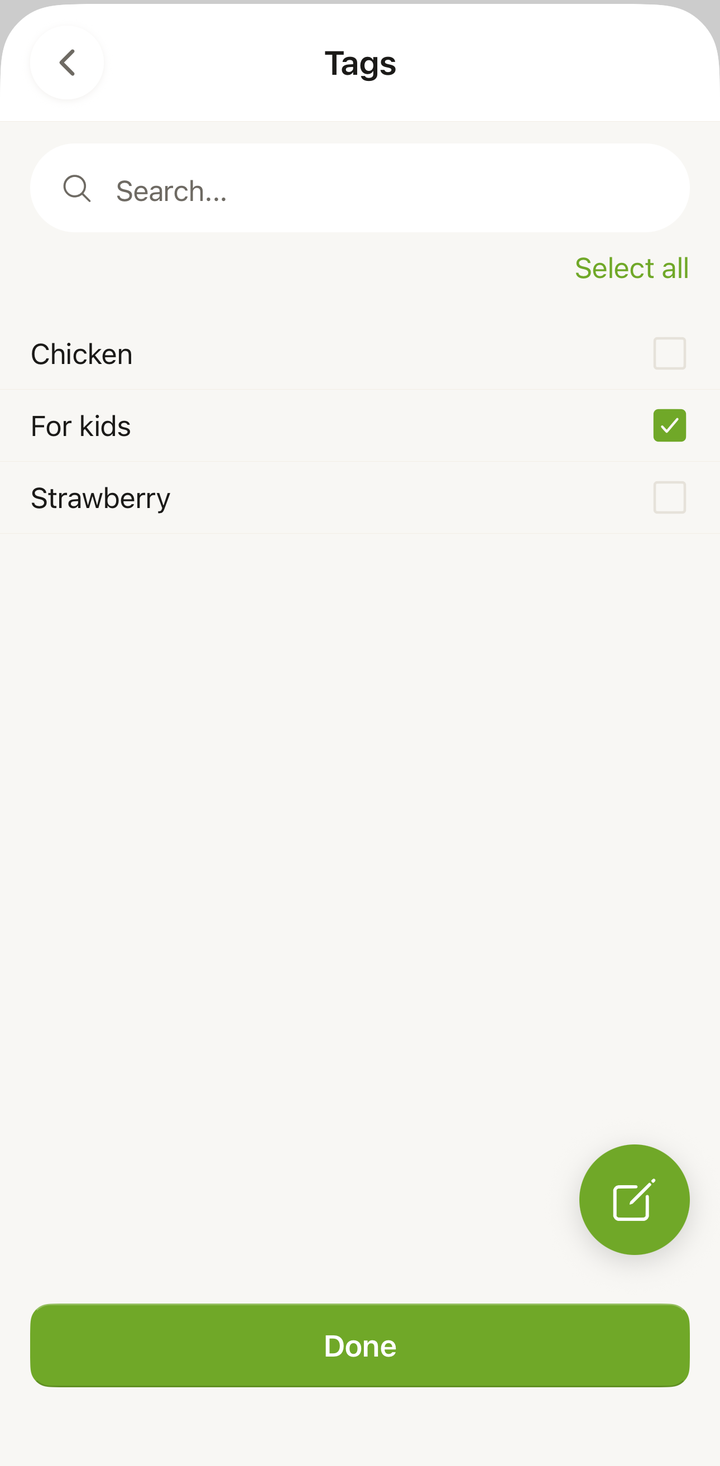
- Tap the Tags row to open the tag picker
- Toggle tags on or off, or type a new tag to create one
- Tap the checkmark to save
Filtering by Tags
Tags become powerful when you use them to filter your collection:
- Go to the Recipes tab
- Tap the Filter icon
- In the filters panel, find the Tags section
- Select one or more tags
- Tap Apply
Only recipes with the selected tags will be shown. Combine tag filters with other filters (meal type, cuisine, cook time) for precise results.
Suggested Tag Ideas
Here are some popular tags to get you started:
By effort:
- quick
- easy
- make-ahead
- one-pot
- no-cook
By audience:
- kid-friendly
- date-night
- crowd-pleaser
- guest-approved
By attribute:
- comfort-food
- healthy
- indulgent
- seasonal
- budget-friendly
By dietary:
- vegetarian
- vegan
- gluten-free
- dairy-free
- low-carb
By status:
- tried-and-loved
- want-to-try
- needs-tweaking
Tags vs. Cookbooks
Tags and cookbooks serve different organizational purposes:
| Feature | Tags | Cookbooks |
|---|---|---|
| Purpose | Label attributes | Group by theme |
| Browsing | Filter to find recipes | Open to see a curated collection |
| Feel | Like sticky notes | Like folders |
| Best for | Quick attributes | Curated sets |
You can use both together. A recipe might be in the “Italian” cookbook and also tagged “quick” and “kid-friendly.”
Managing Your Tags
Removing a Tag from a Recipe
- Open the recipe and tap ••• → Edit recipe
- Tap the Tags row and toggle off the tag you want to remove
- Tap the checkmark to save
Keeping Tags Consistent
The most common mistake with tags is creating similar but different tags — like “quick” and “fast” and “under 30 min” that all mean the same thing. Try to:
- Pick one tag per concept and stick with it
- Use the tag suggestions that appear as you type — they show existing tags that match
- Review your tags occasionally and clean up duplicates
Tips for Effective Tagging
- Start with 5-10 tags that match how you think about food
- Tag during import — it’s faster than going back later
- Don’t over-tag — 2-4 tags per recipe is usually enough
- Use tags for things that aren’t covered by meal type or cuisine — those have their own filter categories
- The “tried-and-loved” tag is a fan favorite — mark recipes you’ve actually cooked and enjoyed
Thanks for your feedback! We're glad it helped.