
Print a Recipe
Articles in this section
🚀 Getting Started
📥 Importing Recipes
- How to Import Recipes
- Import from a Website
- Import from Instagram
- Import from Facebook
- Import from TikTok
- Import from Pinterest
- Import from YouTube
- Scan a Recipe from Photo
- Dictate a Recipe by Voice
- Import by Pasting Text
- Use the In-App Browser
- Write a Recipe from Scratch
- Review & Edit Before Saving
- Understanding Import Credits
📂 Managing Recipes
👨🍳 Cooking Mode
📅 Meal Planning
🛒 Grocery List
📤 Sharing & Export
💳 Billing & Subscription
⚙️ Account & Settings
ℹ️ About Cookonut
💡 Ideas & Feedback
Sometimes you just want a recipe on paper — taped to the fridge, tucked into a binder, or propped up on the counter. Cookonut makes printing easy with a clean, printer-friendly format.
How to Print a Recipe
- Open the recipe you want to print
- Tap the options menu (three dots)
- Choose Print
- Your phone’s print dialog opens with a preview
- Select your printer
- Adjust settings if needed (copies, paper size, color vs. black & white)
- Tap Print
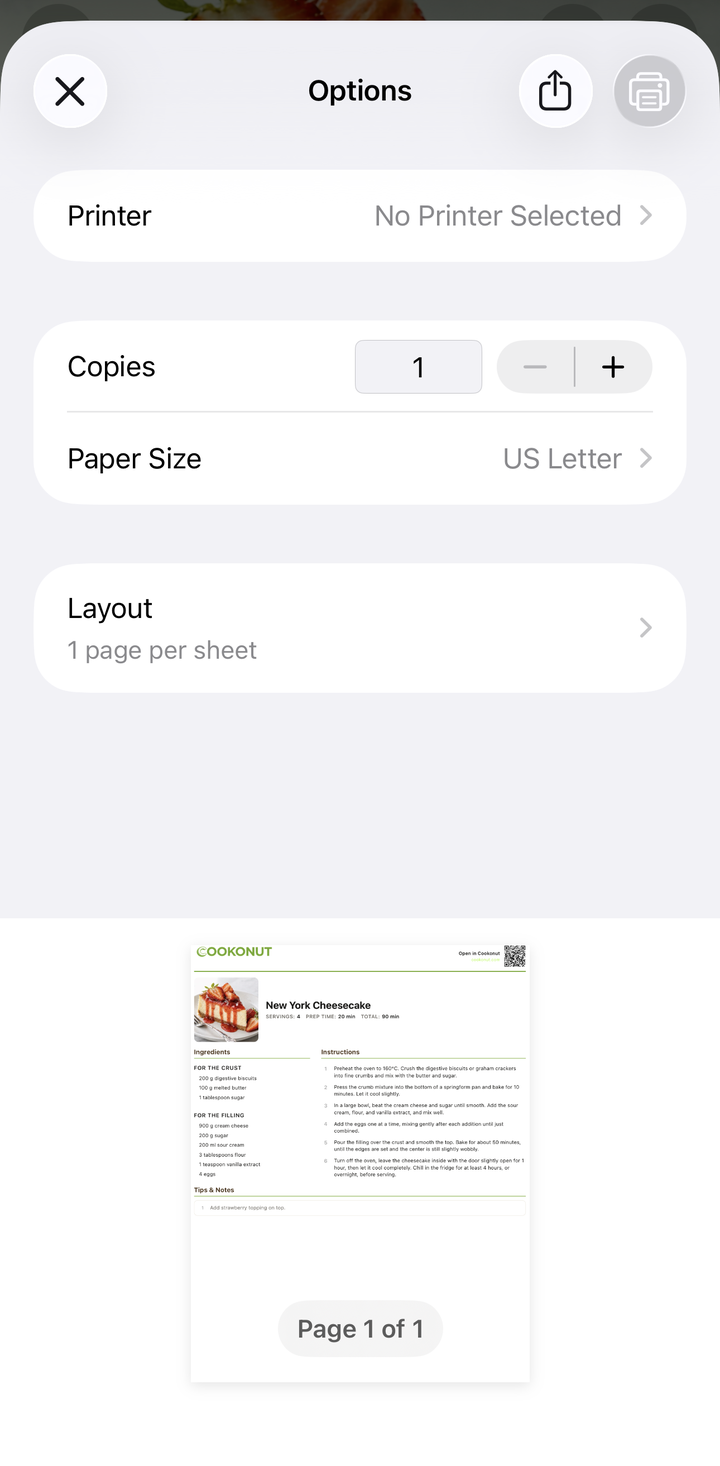
What the Printout Looks Like
The printed recipe is clean and well-organized:
- Recipe title prominently at the top
- Prep time, cook time, and servings listed clearly
- Ingredients in a clean list with quantities
- Instructions numbered for easy following
- Photo included if available (you can save ink by printing without it)
- Formatted to fit standard paper (A4 or Letter)
The layout is optimized for readability — large enough text to read from a counter, with good use of space.
Printing Tips
Save ink: If you’re printing in color and want to save ink, check if your printer settings offer a “black and white” or “grayscale” option. The recipe is perfectly readable without color.
Paper size: The printout automatically adjusts to your paper size — Letter (US) or A4 (international).
Multiple copies: If you’re printing a recipe for a cooking class or a group, just set the copies in the print dialog.
Scale before printing: If you want the printed recipe to show different servings, scale them in the app before printing. The printed version will reflect the adjusted quantities.
Without a Printer
If you don’t have a printer but still want a physical copy:
- Export as PDF instead (see the Export a Recipe as PDF article)
- Save the PDF to your phone or cloud storage
- Print it later at a library, office, or print shop
Or use the share option to send the recipe to someone who has a printer.
Printing for a Recipe Binder
Many home cooks love keeping a physical recipe binder. Here’s a workflow:
- Try a recipe in cooking mode
- If you love it, print it out
- Hole-punch the page and add it to your binder
- Over time, your binder becomes a curated collection of your absolute favorites
Connecting to a Printer
Cookonut uses your phone’s built-in printing capabilities:
On iPhone/iPad:
- Works with any AirPrint-compatible printer on the same Wi-Fi network
- The printer should appear automatically in the print dialog
On Android:
- Works with printers connected via Wi-Fi or your phone’s print service
- You may need to install your printer manufacturer’s app for full compatibility
Printing Is Free
Printing recipes is available on all plans, including the free tier. Print as many recipes as you want.
Thanks for your feedback! We're glad it helped.