
Submit an Idea or Feature Request
Articles in this section
🚀 Getting Started
📥 Importing Recipes
- How to Import Recipes
- Import from a Website
- Import from Instagram
- Import from Facebook
- Import from TikTok
- Import from Pinterest
- Import from YouTube
- Scan a Recipe from Photo
- Dictate a Recipe by Voice
- Import by Pasting Text
- Use the In-App Browser
- Write a Recipe from Scratch
- Review & Edit Before Saving
- Understanding Import Credits
📂 Managing Recipes
👨🍳 Cooking Mode
📅 Meal Planning
🛒 Grocery List
📤 Sharing & Export
💳 Billing & Subscription
⚙️ Account & Settings
ℹ️ About Cookonut
💡 Ideas & Feedback
Cookonut is built with its community in mind. If you have an idea for a new feature, an improvement to an existing one, or a suggestion that would make the app better, we want to hear it.
How to Submit an Idea
- Open Cookonut and tap the More tab
- Under Feedback, tap Ideas & Suggestions
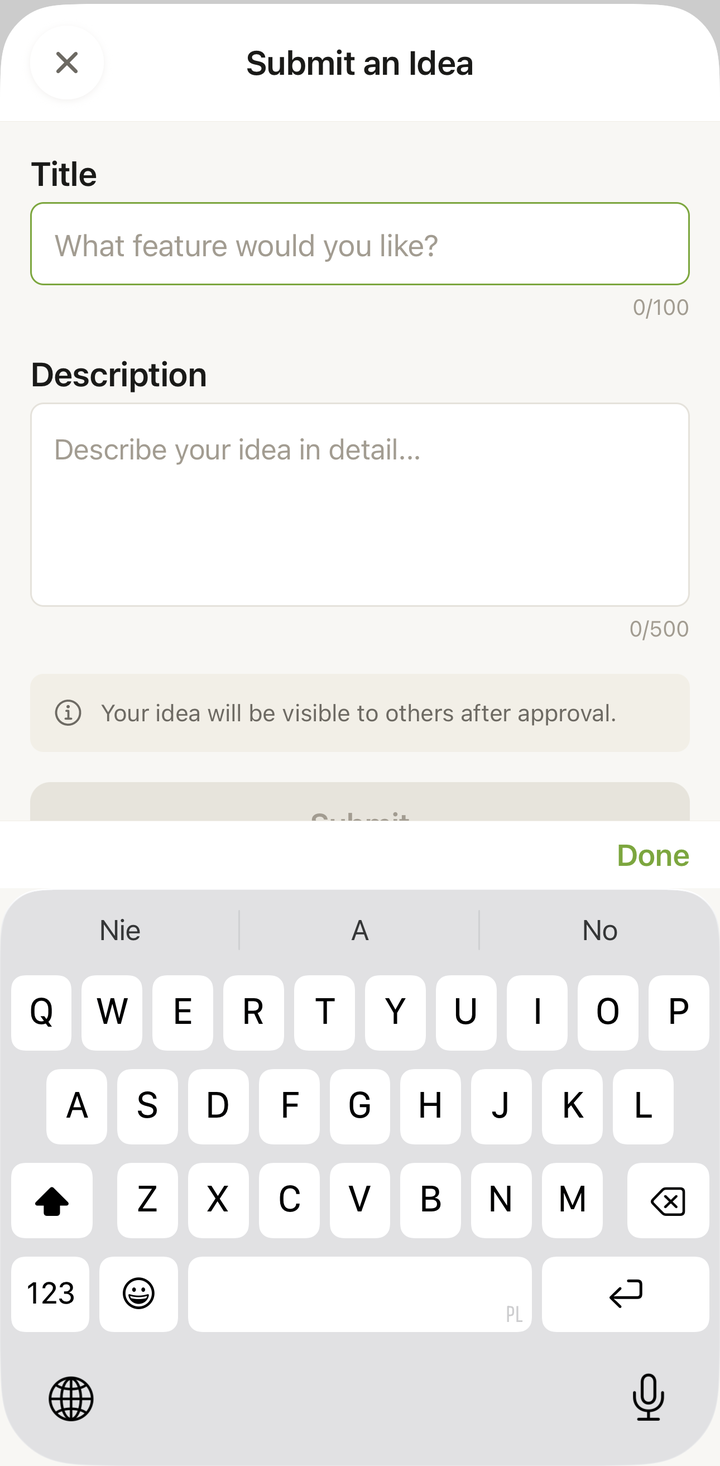
- Tap Submit an Idea
- Fill in the Title field — a short summary of your idea
- Fill in the Description field — explain what it is, how it would work, and why you’d find it useful
- Tap Submit
After you submit, you’ll see a confirmation. Your idea is verified by our team first, then it goes live for the community to vote on. Until it’s approved, it shows a Waiting for approval status that only you can see.
What Makes a Great Idea Submission
The more detail you provide, the better we can understand your suggestion:
- What’s the feature? Describe it in a sentence or two
- Why do you want it? What problem does it solve for you?
- How would it work? If you have an idea for how it would look or function, describe it
- Example scenario: “I often cook for large groups, so I’d love to be able to scale recipes beyond 12 servings”
You don’t need to be a designer or a developer — just describe what you’d like to see from your perspective as a user.
Examples of Good Ideas
Here are the kinds of ideas that help us improve Cookonut:
- “I’d love a way to mark recipes as ‘tried’ so I can see which ones I’ve actually cooked”
- “It would be great if the grocery list could automatically remove items I usually have at home”
- “Could the meal planner show total calories for the day? It would help with diet planning”
- “I wish I could import recipes by sharing directly from Safari to Cookonut”
All of these describe a user need with a clear scenario, which makes them actionable for us.
What Happens After You Submit
- We verify every idea — your submission starts as Waiting for approval and no idea goes unread
- Approved ideas open for voting — once verified, your idea becomes Open for voting and the whole community can vote on it
- Popular ideas get prioritized — if many users vote for the same thing, it moves up our list and can become In Progress
- Implemented or not planned — ideas we build are marked Implemented; ones that don’t fit are marked Not planned
We can’t promise every idea will be built, but every idea influences our roadmap.
There’s a limit of 5 ideas per day to keep things organized — if you reach it, come back tomorrow with more suggestions.
Browse Community Ideas
You can also browse ideas submitted by other Cookonut users in the same Ideas & Suggestions screen:
- Use the Vote tab to see ideas that are open for voting, and the Done tab to see what’s already implemented
- Sort by Top Voted, Newest, or My Ideas
- Tap Vote on ideas you agree with (see the “Vote on Community Ideas” article)
Voting helps us understand which features matter most to the community.
Ideas vs. Bug Reports
- Ideas are suggestions for new features or improvements
- Bug reports are about something that’s broken or not working correctly
If something isn’t working as expected, use Report a Bug (also under More → Feedback) rather than submitting it as an idea. See the Contact Support article for details.
Tips
- Search existing ideas first — someone may have already suggested the same thing. If so, vote for it instead of submitting a duplicate.
- Be specific — “make the app better” is hard to act on, while “add a timer that beeps louder” is very clear
- One idea per submission — this makes it easier for us to track and for others to vote on
- Your ideas matter — many of Cookonut’s best features started as user suggestions
Thanks for your feedback! We're glad it helped.