
Data Sync & Offline Support
Articles in this section
🚀 Getting Started
📥 Importing Recipes
- How to Import Recipes
- Import from a Website
- Import from Instagram
- Import from Facebook
- Import from TikTok
- Import from Pinterest
- Import from YouTube
- Scan a Recipe from Photo
- Dictate a Recipe by Voice
- Import by Pasting Text
- Use the In-App Browser
- Write a Recipe from Scratch
- Review & Edit Before Saving
- Understanding Import Credits
📂 Managing Recipes
👨🍳 Cooking Mode
📅 Meal Planning
🛒 Grocery List
📤 Sharing & Export
💳 Billing & Subscription
⚙️ Account & Settings
ℹ️ About Cookonut
💡 Ideas & Feedback
Cookonut keeps your recipes, meal plans, and settings backed up to the cloud and synced across devices. It also works offline so you can access your recipes even without an internet connection.
How Cloud Sync Works
When you’re connected to the internet, Cookonut automatically syncs your data:
- Recipes — every recipe you save, edit, or delete is synced
- Cookbooks — your cookbook structure and recipe assignments
- Meal plans — your weekly meal plans
- Grocery lists — your current list and checked items
- Settings — preferences like language, units, and theme
- Tags and categories — all your organizational metadata
Sync happens in the background whenever you make changes. You don’t need to tap a sync button or do anything manual.
Multi-Device Sync
Your Cookonut account works across multiple devices:
- Sign in with the same account on a second device
- Your recipes, meal plans, and settings appear automatically
- Changes on one device sync to the other
This is useful if you use a phone while cooking and a tablet for meal planning, or if you get a new phone and want all your data on it.
Offline Access
Cookonut is designed to work even when you don’t have an internet connection:
What Works Offline
- Browsing your recipes — all your saved recipes are available
- Viewing recipe details — ingredients, steps, times, and notes
- Cooking mode — follow recipes step by step with timers
- Viewing your meal plan — see what’s planned for the week
- Viewing your grocery list — check off items at the store
What Requires Internet
- Importing recipes — AI processing needs a connection
- Creating, editing, or deleting — saving a new recipe, editing one, checking off grocery items, or any other change needs a connection
- Creating an account / signing in
- Upgrading to Premium
Cookonut does not queue changes you make offline. To save edits or any other change, you need to be online — there’s no local write queue that syncs later.
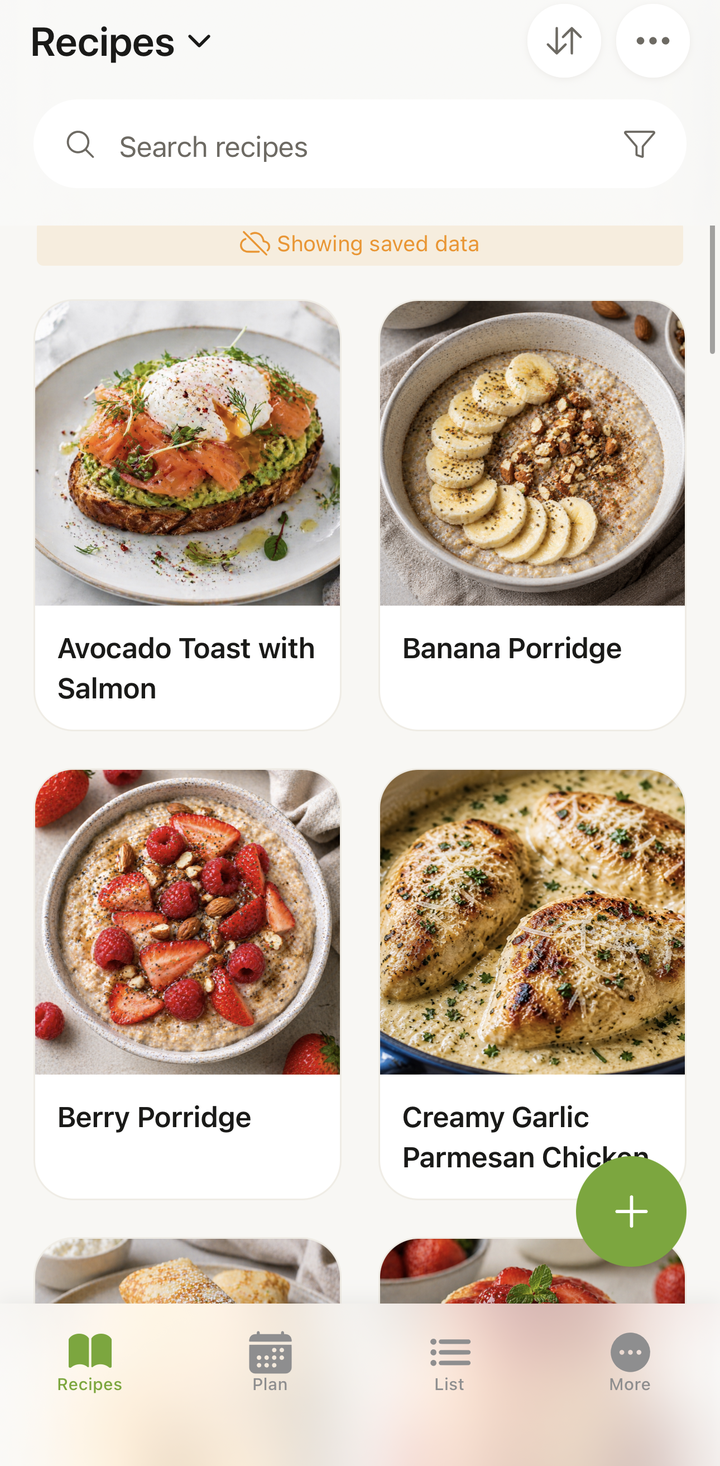
How Offline Works
Cookonut keeps a local copy of your data on your device. When you open a recipe offline, you’re reading from this local cache, so browsing and cooking work without a connection. Making changes is different: creating, editing, deleting, or checking off grocery items all require connectivity, because those changes aren’t queued for later — you’ll need to be online for them to take effect.
Common Sync Scenarios
At the grocery store with spotty signal: Your grocery list is available to view offline, so you can read it even in a cellular dead zone. Checking items off does need a connection, so a quick signal at the store keeps your list up to date.
Cooking in a kitchen with no Wi-Fi: All your recipes and cooking mode work without internet. Set timers, follow steps, check ingredients — everything works.
Traveling without data: Your entire recipe collection is accessible. Browse, plan, and cook without needing connectivity.
New device: Sign in with your account and your data downloads from the cloud. Once synced, it’s all available locally.
Troubleshooting Sync Issues
Data Not Appearing on a Second Device
- Make sure you’re signed in with the same account on both devices
- Check your internet connection on both devices
- Pull down to refresh on the Recipes tab to trigger a sync
- Wait a moment — large collections may take a minute to fully sync
Changes Not Syncing
- Check your internet connection
- Close and reopen the app
- Pull down to refresh
- If changes still aren’t syncing, try signing out and back in
Offline Data Seems Outdated
If you made changes on another device while this one was offline, the local data may be stale:
- Connect to the internet
- Open Cookonut and pull down to refresh
- The latest data will download from the cloud
Data Safety
Your data is securely stored in the cloud:
- Encrypted in transit and at rest
- Backed up regularly — we don’t lose your data
- Private by default — only you can access your recipes (unless you explicitly share them)
Even if you lose your phone, your recipes are safe in the cloud. Just sign in on a new device.
Sync and Offline Are Free
Cloud sync and offline access are included with all plans, including the free tier.
Thanks for your feedback! We're glad it helped.