
Units & Regional Settings
Articles in this section
🚀 Getting Started
📥 Importing Recipes
- How to Import Recipes
- Import from a Website
- Import from Instagram
- Import from Facebook
- Import from TikTok
- Import from Pinterest
- Import from YouTube
- Scan a Recipe from Photo
- Dictate a Recipe by Voice
- Import by Pasting Text
- Use the In-App Browser
- Write a Recipe from Scratch
- Review & Edit Before Saving
- Understanding Import Credits
📂 Managing Recipes
👨🍳 Cooking Mode
📅 Meal Planning
🛒 Grocery List
📤 Sharing & Export
💳 Billing & Subscription
⚙️ Account & Settings
ℹ️ About Cookonut
💡 Ideas & Feedback
Cookonut can display recipe measurements in whichever system you’re comfortable with. Set your preference once, and every recipe in your collection shows quantities in your chosen units.
Setting Your Preferred Units
- Open Cookonut
- Go to the More tab
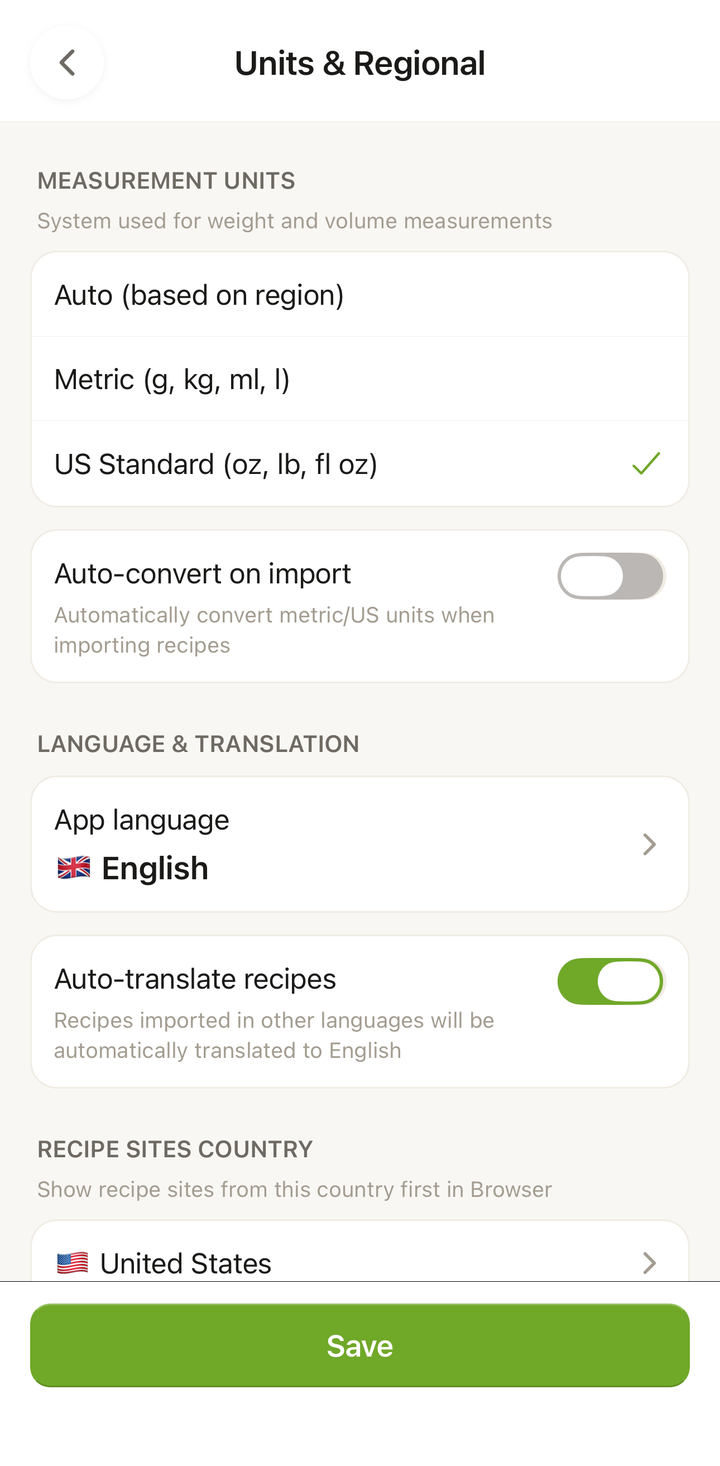
- Tap Units & Regional
- Under Measurement units, choose your preferred system:
- Metric — grams, kilograms, milliliters, liters
- US Standard — ounces, pounds, fluid ounces, cups
You can also set Temperature (Celsius or Fahrenheit) and turn on Auto-convert on import so imported recipes are converted to your units automatically.
How Unit Conversion Works
When a recipe was imported with different units than your preference, Cookonut automatically converts:
| Your setting | Recipe says | You see |
|---|---|---|
| Metric | 2 cups flour | 480 ml flour |
| Metric | 350°F | 175°C |
| Imperial | 500g chicken | 17.6 oz chicken |
| Imperial | 200°C | 400°F |
Conversions happen automatically — you don’t need to do anything after setting your preference.
What About Volume vs. Weight?
Cooking measurements can be either volume (cups, tablespoons, milliliters) or weight (grams, ounces). Cookonut respects the original recipe’s approach:
- If a recipe uses cups, it stays as cups (or converts to ml if you prefer metric volume)
- If a recipe uses grams, it stays as grams (or converts to ounces if you prefer imperial)
The app doesn’t convert between volume and weight (e.g., it won’t convert “1 cup flour” to “120 grams flour”) because that conversion depends on the specific ingredient’s density. Instead, it converts within the same measurement type.
Quick Unit Toggle
You can temporarily view a recipe in a different unit system without changing your global setting:
- Open any recipe
- Look for the unit toggle near the ingredients
- Tap it to switch between metric and imperial for that recipe
This is handy when you’re sharing a recipe with someone who uses a different system, or when you want to see both systems for reference.
Regional Conventions
Different regions have different measurement conventions:
- United States — cups, tablespoons, teaspoons, Fahrenheit, pounds, ounces
- Europe — grams, milliliters, Celsius, kilograms
- United Kingdom — a mix of metric and imperial (metric for weight, sometimes pints for liquid)
- Australia — metric, but with a 250ml cup (vs. 240ml in the US)
Cookonut handles these regional variations and normalizes measurements to your chosen system.
Changing Units Later
You can change your unit preference anytime:
- Go to More > Units & Regional
- Switch between Metric and US Standard under Measurement units
- All recipes in your collection immediately update to show the new units
No data is lost — the original measurements are preserved, and conversions are recalculated.
Units and Grocery Lists
Your grocery list also respects your unit preference. If you use metric, your shopping list shows grams and milliliters. Switch to imperial, and you’ll see ounces and cups.
Units and PDF Export
When you export a recipe as PDF or print it, the exported version uses your current unit preference. If you want a PDF in metric but normally use imperial, switch your units before exporting, then switch back.
Tips
- Set units during initial setup — this is one of the first things Cookonut asks during onboarding
- Metric is more precise for baking — many bakers prefer weighing ingredients in grams
- Imperial is more intuitive for many everyday cooking tasks in the US
- Use the quick toggle when following a recipe from a different region
Thanks for your feedback! We're glad it helped.