
Contact Support
Articles in this section
🚀 Getting Started
📥 Importing Recipes
- How to Import Recipes
- Import from a Website
- Import from Instagram
- Import from Facebook
- Import from TikTok
- Import from Pinterest
- Import from YouTube
- Scan a Recipe from Photo
- Dictate a Recipe by Voice
- Import by Pasting Text
- Use the In-App Browser
- Write a Recipe from Scratch
- Review & Edit Before Saving
- Understanding Import Credits
📂 Managing Recipes
👨🍳 Cooking Mode
📅 Meal Planning
🛒 Grocery List
📤 Sharing & Export
💳 Billing & Subscription
⚙️ Account & Settings
ℹ️ About Cookonut
💡 Ideas & Feedback
If you can’t find the answer in our help articles, or you’re experiencing an issue that needs personal attention, our support team is here to help.
How to Contact Support
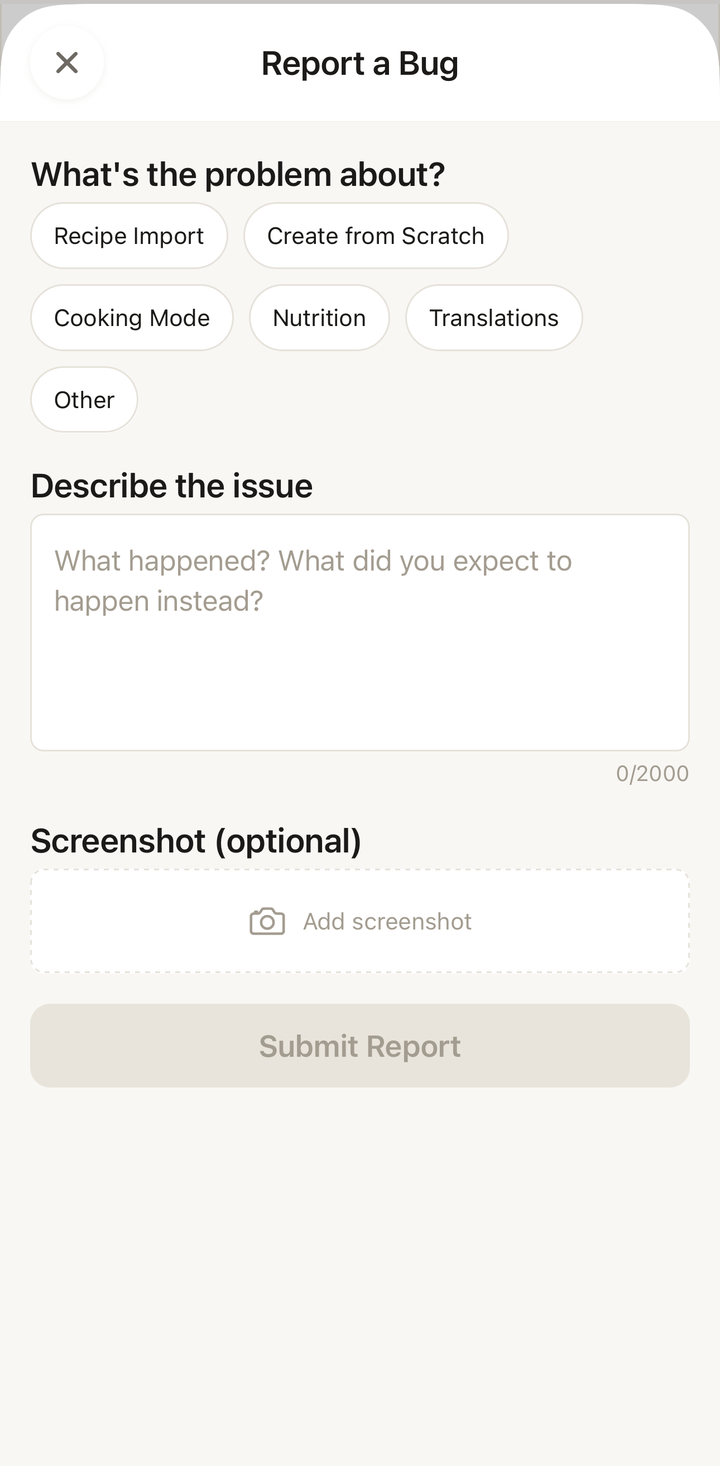
Report a Bug From Inside the App
If something isn’t working, the fastest way to tell us is the built-in Report a Bug tool:
- Open Cookonut and tap the More tab
- Under Feedback, tap Report a Bug
- Choose a category (Recipe Import, Cooking Mode, Nutrition, Translations, and so on)
- Describe the issue in your own words — what happened and what you expected instead
- Optionally tap Add screenshot to attach an image
- Tap Submit Report
We review every report and notify you when it’s resolved. You can submit up to 20 bug reports per day.
By Email
For anything that isn’t a bug — account questions, billing, or general feedback — email us directly at:
Include:
- A description of your issue
- What you were doing when the problem occurred
- Your device model and OS version
- Screenshots if relevant
What to Include in Your Message
The more information you provide, the faster we can help. Here’s a template:
For bug reports:
- What happened?
- What did you expect to happen?
- Steps to reproduce the issue
- Your device model (e.g., iPhone 15, Samsung Galaxy S24)
- Your OS version (e.g., iOS 18.2, Android 15)
- Your Cookonut app version (found in Settings)
For import issues:
- The URL you tried to import (if applicable)
- The import method you used (social media, in-app browser, photo, voice, etc.)
- The error message you saw (if any)
- Whether you’ve tried alternative import methods
For account issues:
- The email address associated with your account
- Your sign-in method (Apple, Google, or email)
- What you’re trying to do and what’s happening instead
Response Time
We aim to respond to all support requests within 24-48 hours during business days. Complex issues may take longer to investigate, but we’ll let you know if that’s the case.
Before Contacting Support
To help you get a faster resolution, try these first:
- Search the help center — your question may already be answered
- Try the troubleshooting steps in our help articles
- Update the app to the latest version — your issue may already be fixed
- Restart the app and your phone — this resolves many common issues
Types of Support Requests
Bug reports — Something isn’t working as expected. We’ll investigate and fix it.
How-to questions — You want to know how to do something. We’ll point you to the right help article or walk you through it.
Account issues — Problems signing in, subscription questions, or data concerns. We’ll help resolve them.
Import problems — A specific recipe or website isn’t importing correctly. We’ll look into compatibility.
Feature requests — Want a new feature? Use the Submit an Idea feature instead (see that article), so other users can vote on it too.
Feedback — General feedback about the app is always welcome. We read every message.
Privacy and Security
When you contact support:
- We can see your account information to help diagnose issues
- We never ask for your password
- We never share your personal information
- Support conversations are confidential
Subscription and Billing Issues
For billing questions related to your Premium subscription:
- Refunds are handled through Apple (App Store) or Google (Play Store), not directly through us
- Subscription management (cancel, change plan) is done through your device’s subscription settings
- We can help verify your subscription status and troubleshoot Premium features not appearing
We’re Here to Help
Whether it’s a small question or a complex issue, don’t hesitate to reach out. We’re a small team that genuinely cares about your experience with Cookonut, and we’ll do our best to help.
Thanks for your feedback! We're glad it helped.