
Understanding Import Credits
Articles in this section
🚀 Getting Started
📥 Importing Recipes
- How to Import Recipes
- Import from a Website
- Import from Instagram
- Import from Facebook
- Import from TikTok
- Import from Pinterest
- Import from YouTube
- Scan a Recipe from Photo
- Dictate a Recipe by Voice
- Import by Pasting Text
- Use the In-App Browser
- Write a Recipe from Scratch
- Review & Edit Before Saving
- Understanding Import Credits
📂 Managing Recipes
👨🍳 Cooking Mode
📅 Meal Planning
🛒 Grocery List
📤 Sharing & Export
💳 Billing & Subscription
⚙️ Account & Settings
ℹ️ About Cookonut
💡 Ideas & Feedback
Cookonut uses a credit system for AI-powered recipe imports. Here’s everything you need to know about how credits work, what uses them, and how to make the most of your monthly allowance.
What Is an Import Credit?
An import credit is used each time Cookonut’s AI processes a recipe from an external source. The AI reads, analyzes, and structures the recipe data into a clean, organized format — and each time it does this, it costs one credit.
What Uses a Credit?
These four import methods each use 1 credit:
- Search the web — finding and saving a recipe from a website using the in-app browser
- Scan recipe — scanning a cookbook page, recipe card, or screenshot
- Dictate recipe — dictating a recipe by speaking
- Paste text — pasting recipe text for the AI to structure
All four methods share the same credit pool. There’s no separate budget for photos vs. links — every AI-powered import uses one credit from the same total.
What Does NOT Use a Credit?
- Writing a recipe from scratch (the “Create from scratch” option) — this is always free and unlimited
- Editing a saved recipe — making changes after saving never costs a credit
- Browsing the in-app browser without saving a recipe
- Using all other features — cooking mode, meal planning, grocery lists, cookbooks, searching, filtering, exporting, and printing are all free
How Many Credits Do I Get?
| Plan | Monthly Credits |
|---|---|
| Free | 10 credits per month |
| Premium | Unlimited |
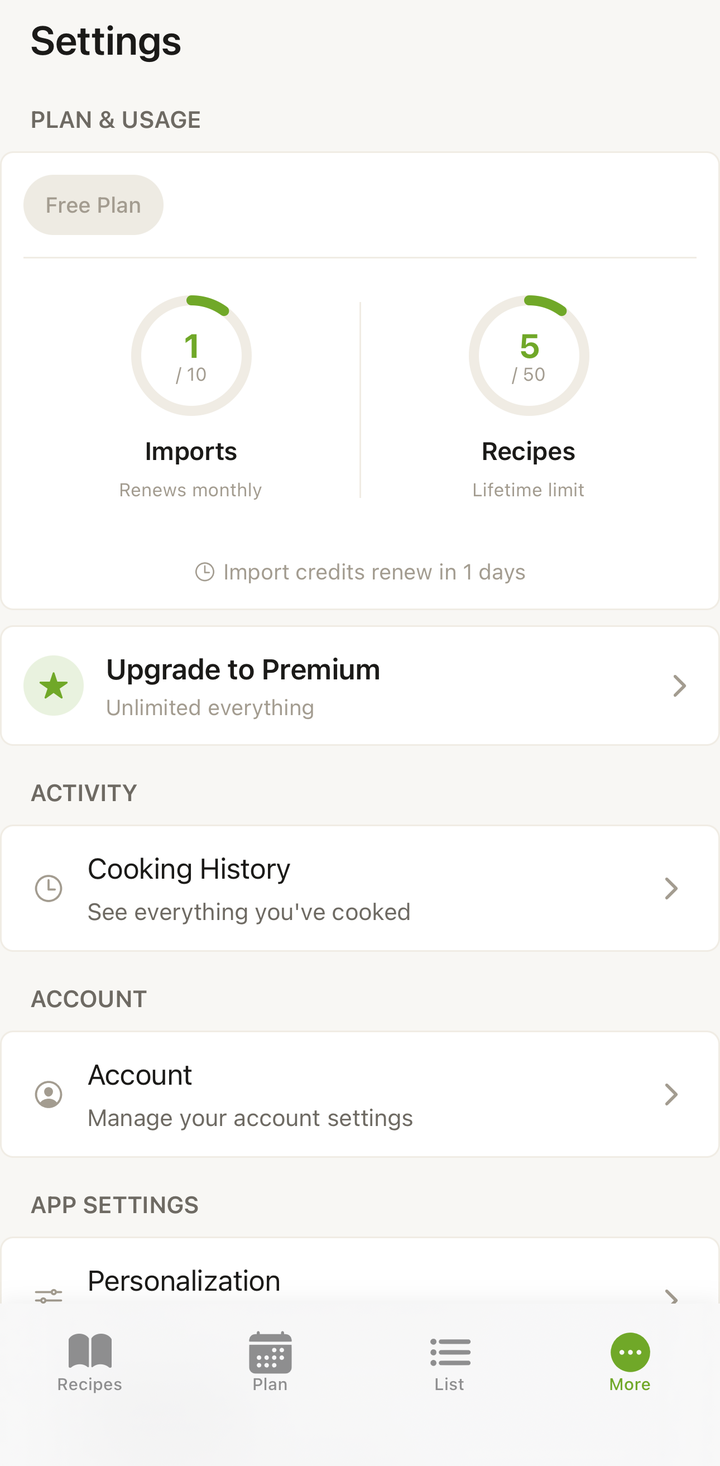
Free plan credits reset monthly. Your credit count and reset date are visible in your account settings.
Checking Your Remaining Credits
To see how many credits you have left:
- Open the More tab
- Look for your import credits counter
- You’ll see the number of credits remaining and when they reset
Making the Most of Your Credits
If you’re on the free plan and want to stretch your 10 monthly credits:
- Use “Create from scratch” for recipes you know by heart — save credits for recipes that actually need AI processing
- Import from well-structured food blogs — they produce the best results with fewer re-imports needed
- Review carefully before saving — catch errors in the preview so you don’t need to re-import
- Copy recipe text from social media and use Paste Text — this sometimes works better than importing a social media link directly
When a Credit Is Used
A credit is consumed as soon as the AI starts processing your import — not when you tap “Save.” This means:
- If you import a recipe but decide not to save it, the credit is still used
- If an import fails or produces poor results, the credit is still used
- Re-importing the same recipe from the same link uses another credit
This is why it’s worth reviewing the preview carefully and making edits there, rather than discarding and re-importing.
Running Out of Credits
If you’ve used all your monthly credits:
- You can still write recipes from scratch — unlimited
- You can still edit existing recipes — unlimited
- You can still use all other features — meal planning, grocery lists, cooking mode, etc.
- Your credits will reset at the start of your next monthly cycle
- Or you can upgrade to Premium for unlimited imports
Upgrading to Premium
Premium gives you unlimited AI imports along with unlimited recipe storage, nutrition information, on-demand recipe translation, and recipe sharing. It’s available at $4.99/month or $38.99/year.
To upgrade, go to Settings and tap Upgrade to Premium.
Thanks for your feedback! We're glad it helped.