
Scale Recipe Servings
Articles in this section
🚀 Getting Started
📥 Importing Recipes
- How to Import Recipes
- Import from a Website
- Import from Instagram
- Import from Facebook
- Import from TikTok
- Import from Pinterest
- Import from YouTube
- Scan a Recipe from Photo
- Dictate a Recipe by Voice
- Import by Pasting Text
- Use the In-App Browser
- Write a Recipe from Scratch
- Review & Edit Before Saving
- Understanding Import Credits
📂 Managing Recipes
👨🍳 Cooking Mode
📅 Meal Planning
🛒 Grocery List
📤 Sharing & Export
💳 Billing & Subscription
⚙️ Account & Settings
ℹ️ About Cookonut
💡 Ideas & Feedback
Cooking for more people than the recipe calls for? Or just making a half batch? Cookonut lets you scale servings up or down, and all ingredient quantities adjust automatically.
How to Scale Servings
- Open any recipe
- Find the servings indicator (usually near the top, showing something like “Serves 4”)
- Tap the - or + buttons to decrease or increase the number of servings
- Watch the ingredient quantities update in real time
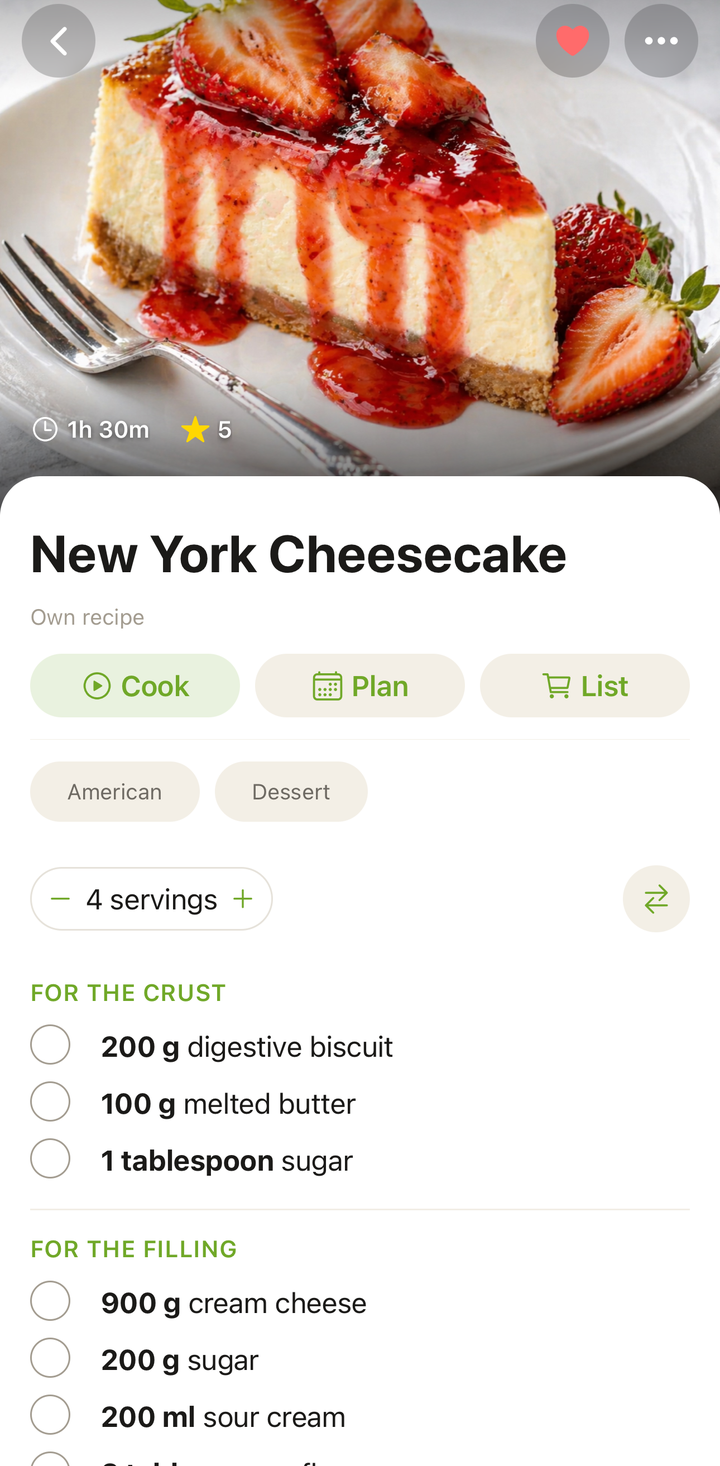
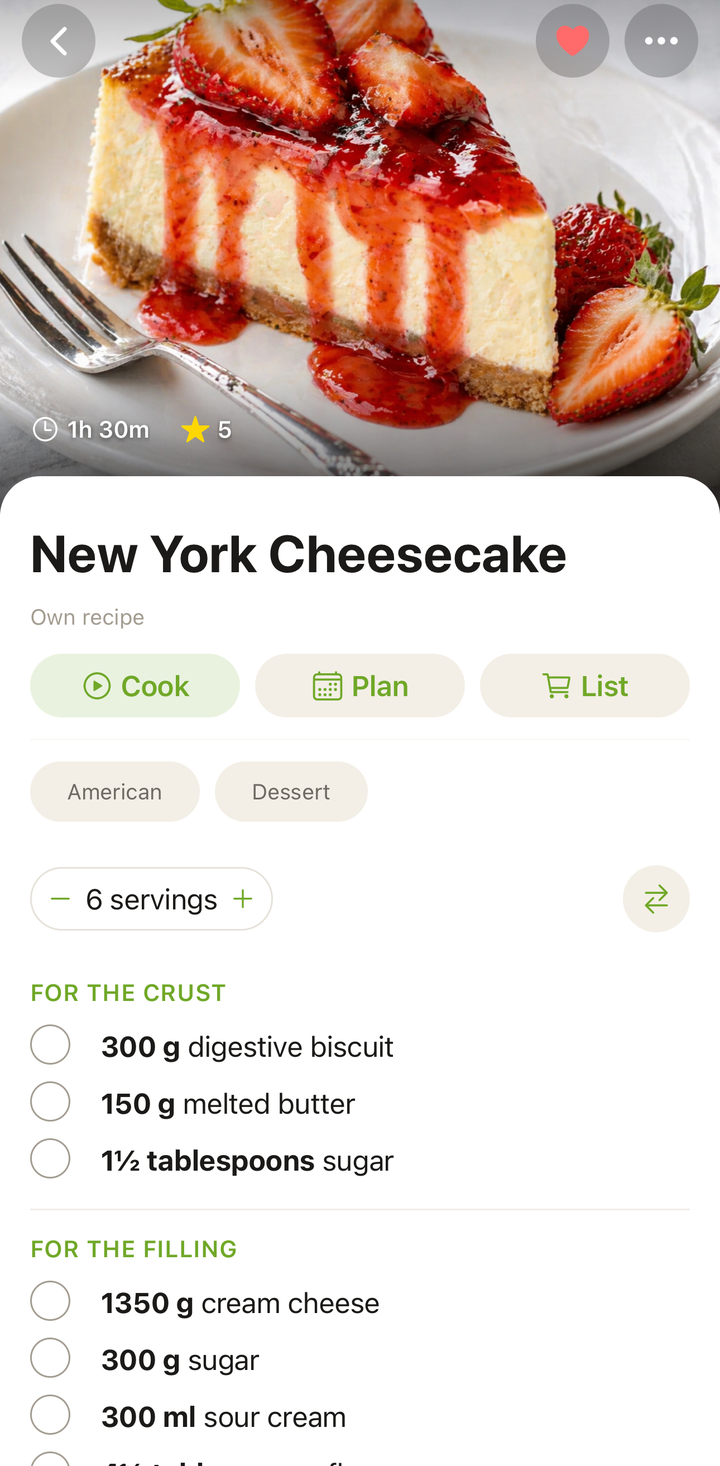
Scaling in Cooking Mode
You can also scale servings while in cooking mode:
- Enter cooking mode for a recipe
- Open the ingredients panel
- Adjust the servings with the +/- buttons
- Ingredient quantities in the panel update immediately
This is handy if you decide mid-cook that you need to double the sauce or make extra.
How Scaling Works
When you change the servings, Cookonut recalculates every ingredient proportionally:
- Original recipe serves 4, you change to 8 — all quantities double
- Original recipe serves 6, you change to 3 — all quantities halve
- Original recipe serves 4, you change to 6 — quantities increase by 50%
The math is done for you — no mental arithmetic needed.
Example
A recipe for 4 servings calls for:
- 400g chicken breast
- 2 tbsp olive oil
- 1 cup rice
Scaled to 6 servings:
- 600g chicken breast
- 3 tbsp olive oil
- 1.5 cups rice
Smart Rounding
Cookonut rounds scaled quantities to practical cooking amounts. You won’t see “2.666 tablespoons” — it’ll show a clean, usable number instead.
Things to Keep in Mind
Scaling is great for ingredients, but some things don’t scale linearly:
Cooking times may not change. Doubling a recipe doesn’t always mean doubling the cook time. A bigger pot of soup may take a few more minutes to come to a boil, but a doubled cookie recipe bakes in the same time — just in more batches.
Seasoning may need adjustment. When scaling up significantly, you might not need to scale salt and spices by the same ratio. It’s often better to scale them conservatively and adjust to taste.
Pan sizes matter. If you double a recipe, you may need a larger pan. Crowding a pan changes how food cooks.
Baking is more sensitive. For baked goods, scaling beyond 2x can affect rising and texture. Consider making two separate batches instead of one quadrupled batch.
Scaling and the Grocery List
When you add a scaled recipe to your meal plan and generate a grocery list, the grocery list uses the scaled quantities. So if you changed a recipe from 4 to 6 servings and then added it to your meal plan, the grocery list will reflect the amounts needed for 6 servings.
Restoring Original Servings
To go back to the original recipe quantities, simply change the servings back to the original number. The stepper always shows the current serving count, so adjust it with the - and + buttons until you’re back to the amount the recipe was originally designed for.
Tips
- Scale before adding to your meal plan to make sure the grocery list reflects the right amounts
- For meal prep, scale up to the number of portions you want to prep for the week
- For a dinner party, increase servings to match your guest count
- When halving baked goods, keep an eye on the oven — smaller batches may bake faster
Thanks for your feedback! We're glad it helped.